You are trying to buy museum tickets online. The page opens, but after three or four seconds, the website is still moving. A large image appears late. The font changes. A button jumps down. A cookie banner changes the layout. A hero image finally loads after the text is already visible.
Technically, the page may have loaded. But from the user’s point of view, the experience feels unfinished.
That is where website performance becomes a business problem, not only a developer problem.
Bounce rate is the percentage of visits where a user leaves without meaningful engagement. It is not always caused by performance. A user may bounce because the content is irrelevant, the offer is wrong, the price is too high, or the page does not answer the question. But if a page is slow, unstable, or hard to interact with, performance becomes a very serious suspect.
I’m Matteo Arellano , and I work on technical SEO, analytics, AI visibility, and browser diagnostics. One thing I keep seeing is that performance problems are often hidden in plain sight. The page looks “fine” after it fully loads, but the first few seconds tell a different story.
There is enough evidence to take this seriously. Google analyzed 11 million mobile ad landing pages across 213 countries and found that many mobile pages were too slow for user expectations. In the same research, Google reported that as page load time went from one second to three seconds, the probability of bounce increased by 32%. When the page load time reached five seconds, the probability of bounce increased by 90%. When it reached ten seconds, it increased by 123%.
Akamai also reported that a 100 millisecond delay in website load time could hurt conversion rates by 7%, and that a two second delay could increase bounce rates by 103%. Vodafone later ran an A/B test focused on Core Web Vitals and found that a 31% improvement in Largest Contentful Paint led to 8% more sales. Propellernet found that faster-than-average visits were 34% more likely to convert than slower-than-average visits.
The exact impact will not be the same for every website. A museum ticketing page, a SaaS landing page, a travel booking flow, and an ecommerce product page all have different users and different expectations. But the direction is clear: slow and unstable pages create friction, and friction can reduce trust, engagement, and conversion.
The real question is not only “is the website fast?”
A basic performance conversation often sounds like this:
The site is slow. Make it faster.
That is not specific enough.
A better question is:
Which resources are being discovered, downloaded, prioritized, rendered, and executed at the wrong time?
A website is not one thing. It is a collection of resources. HTML, CSS, JavaScript, fonts, images, videos, tracking scripts, third-party widgets, analytics tags, booking engines, consent banners, and API calls all compete for attention.
The browser has to decide what to download first, what to delay, what blocks rendering, what can wait, and what is needed for the visible part of the page.
This is why resource loading and browser prioritization matter.
Resource discovery: the browser cannot prioritize what it has not found
Resource discovery means the moment when the browser finds out that a file exists and may need to be downloaded.
A simple image written directly in the HTML is easy to discover:
<img src="/hero-image.jpg" alt="Sagrada Familia ticket page" />The browser reads the HTML document and sees the image. That does not mean it will always load it with the highest priority, but at least the browser knows the image exists.
A background image inside CSS is different:
.hero {
  background-image: url("/hero-image.jpg");
}
In that case, the browser first has to discover the CSS file, download it, parse it, understand which selectors apply, and only then discover the image.
A JavaScript-generated image may be discovered even later because the browser has to download and execute JavaScript before the image is even inserted into the page.
This matters because many important website assets are discovered too late. A hero image, an important font, or a critical above-the-fold visual may not start loading early enough.
Browser priority: discovered does not mean urgent
After the browser discovers resources, it still has to prioritize them.
HTML is normally critical because it contains the document structure.
CSS in the <head> is normally important because it affects
how the page is rendered. Fonts can matter because they affect text display.
JavaScript can be important, but it can also block or delay rendering if
handled badly.
Images are more nuanced. Many images start with a lower priority because the browser does not yet know whether they are visible in the viewport. The viewport is the part of the page currently visible on the user’s screen without scrolling.
After layout, the browser may understand that a certain image is actually visible above the fold. At that point, the browser may increase the image priority. But that can be late for the most important image on the page.
This is where technical SEO, frontend engineering, and user experience meet. The issue is not only the image size. The issue is whether the browser discovers and prioritizes the image early enough.
Largest Contentful Paint: the visible moment that matters
Largest Contentful Paint, usually called LCP, measures when the largest visible image or text block in the viewport is rendered. In simple terms, it asks: when does the main visible content appear?
A slow LCP often means that the user is waiting too long for the main thing they came to see. That main thing could be a hero image, a product image, a heading, a ticket panel, or a booking component.
For a museum ticketing page, the LCP element might be the hero image or the main booking section. For an ecommerce page, it might be the product image. For a consulting homepage, it might be the hero heading or portrait image.
The practical question is:
Is the browser giving the most important visible element enough attention early in the loading process?
Fetch priority: telling the browser what matters earlier
The fetchpriority attribute lets you give the browser a hint
about the relative priority of a resource.
For example:
<img
  src="/hero-image.jpg"
  alt="Sagrada Familia ticket page"
  fetchpriority="high"
/>
In plain English, this tells the browser:
This image is important. Do not wait too long before treating it as urgent.
This can be useful when the image is already discoverable in the HTML, but the browser may not assign high priority early enough.
But this does not mean every image should get
fetchpriority="high". If everything is high priority,
nothing is truly high priority. The point is to identify the real LCP
image or the truly critical visual element.
Preload: helping the browser discover something earlier
Preload solves a slightly different problem.
Fetch priority helps with priority. Preload helps with discovery.
For example, if your hero image is hidden inside CSS, the browser may not discover it early. You can help the browser discover it sooner:
<link
  rel="preload"
  as="image"
  href="/hero-image.jpg"
  fetchpriority="high"
/>
This tells the browser to start fetching the image earlier than it otherwise might.
A simple way to remember the difference is:
| Technique | What it solves | When it helps |
|---|---|---|
| Preload | Discovery | The browser would find the important resource too late. |
| Fetch priority | Priority | The browser finds the resource, but may not treat it as urgent enough. |
| Lazy loading | Bandwidth protection | The resource is below the fold and does not need to load immediately. |
| Defer | JavaScript execution timing | The script can wait until HTML parsing is complete. |
| Async | Non-blocking script loading | The script can execute as soon as it downloads, without blocking HTML parsing. |
The problem with lazy loading the wrong image
Lazy loading is useful for images that are not immediately visible. It protects bandwidth and helps the browser avoid downloading unnecessary assets too early.
This is good for below-the-fold images:
<img
  src="/gallery-image.jpg"
  alt="Museum gallery"
  loading="lazy"
/>
But lazy loading the main hero image is usually a mistake:
<img
  src="/hero-image.jpg"
  alt="Main ticket page"
  loading="lazy"
/>
If that image is the main visible content, delaying it can hurt LCP. The resource the user needs first is being treated like something the user may need later.
That is not optimization. That is false optimization.
How to think about common situations
Performance work becomes easier when you stop guessing and start looking at situations.
1. The LCP image is visible early but starts with low priority
If the image appears directly in the HTML but Chrome DevTools
shows it starting with low or medium priority, consider adding
fetchpriority="high" to the image.
2. The LCP image is hidden inside CSS
If the hero image is a CSS background image, the browser may
discover it late. Consider using
<link rel="preload" as="image"> for that asset.
3. The LCP image has loading="lazy"
If the main above-the-fold image is lazy loaded, remove lazy loading from that image. Lazy loading belongs to resources that can wait.
4. Several above-the-fold images compete at the same time
Decide which visual is truly critical. Not every visible image deserves the same priority. Prioritization is about choosing.
5. Many below-the-fold images load immediately
Use lazy loading for non-critical images. This protects bandwidth for the content the user actually sees first.
6. Third-party scripts compete with core content
Analytics, chat widgets, booking engines, tag managers, and ad scripts can affect loading. Review whether they need to load before the user sees the main content.
Async and defer are not the same thing
JavaScript loading is another common source of confusion.
The async attribute lets a script download without blocking
HTML parsing, but the script executes as soon as it finishes downloading.
That can be useful, but it can also interrupt rendering if the script executes
at an awkward moment.
The defer attribute also lets the script download without blocking
HTML parsing, but it waits to execute until the HTML document has been parsed.
A simple rule:
Use async carefully
Use async for independent scripts that do not depend on
the document structure or other scripts being ready.
Use defer for page scripts
Use defer when the script needs the HTML to be parsed but
does not need to block the first render.
Do not prioritize every script
A script being useful does not mean it is critical for the first visible experience.
How I would audit a page
I would not start by randomly compressing everything. I would start by identifying what the user sees first, what the browser loads first, and where those two things disagree.
The first tool is PageSpeed Insights or Lighthouse. These tools help identify Core Web Vitals issues and give you a first view of LCP, Cumulative Layout Shift, and Interaction to Next Paint.
But the second tool is where the real learning happens: Chrome DevTools.
Open the Network tab. Reload the page. Sort by waterfall and inspect priority. Filter by images, CSS, JavaScript, and fonts. Ask basic but powerful questions:
- Which resources are discovered first?
- Which resources are loaded before the hero content?
- Which image is the actual LCP image?
-
Is the LCP image loaded as an
<img>or as a CSS background? - Does the LCP image have
loading="lazy"? - Does a non-critical resource compete with the visible page?
- Are fonts delaying text rendering?
- Are third-party scripts loading before the main content?
- Is the page shifting after the first render?
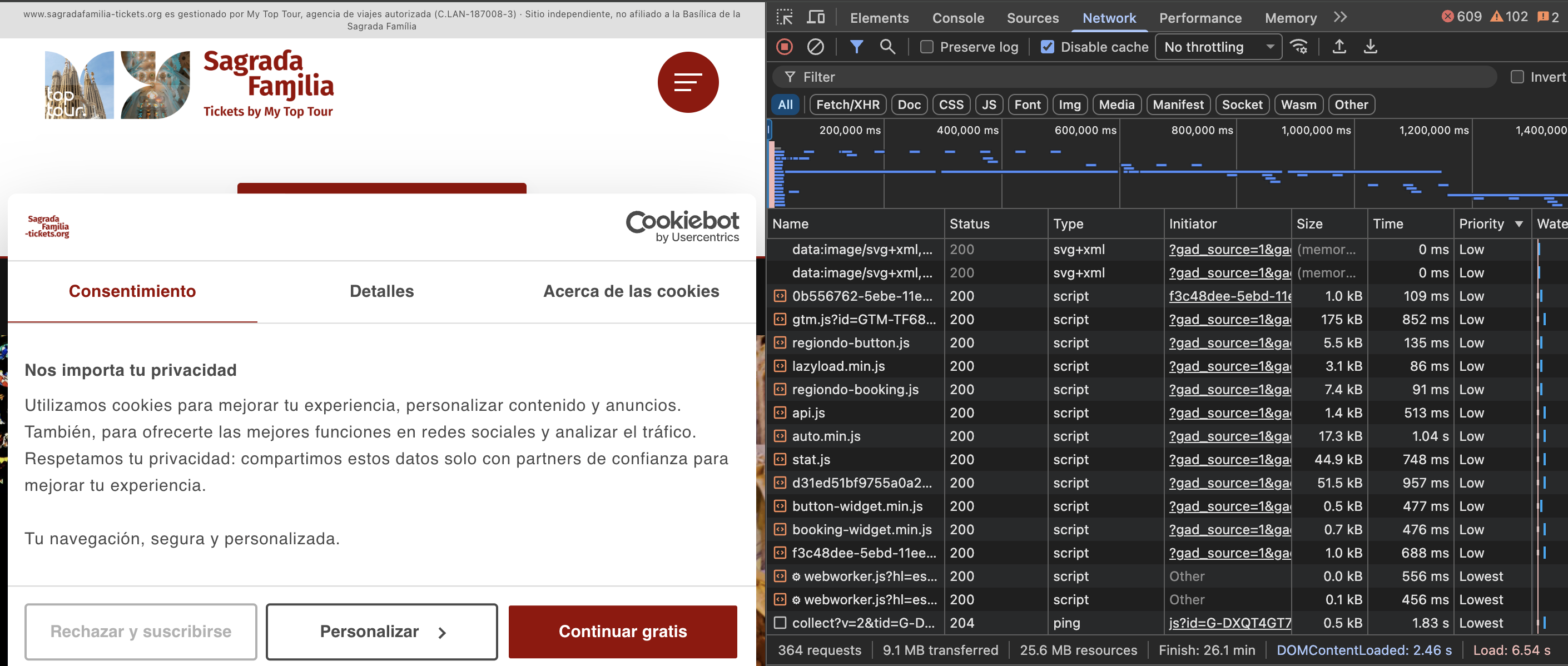
A practical audit table
This is the kind of decision table I like to use because it forces the audit to connect problem, evidence, and action.
| What you see | Likely issue | Practical action |
|---|---|---|
| Main image loads late | The image may be discovered late or prioritized too low. | Check whether it is in HTML, CSS, or JavaScript. Consider preload or fetch priority. |
| Hero image has loading="lazy" | The most important image is being delayed. | Remove lazy loading from the LCP image. |
| Fonts appear late or swap visibly | Font loading may be affecting the perceived stability of the page. | Review font loading strategy, preconnect, preload, and font-display behavior. |
| Many scripts load before visible content | Third-party or non-critical scripts may be competing with critical resources. | Review async, defer, tag manager sequencing, and whether scripts are truly needed early. |
| Layout shifts after first render | Images, ads, banners, fonts, or embedded widgets may lack reserved space. | Reserve dimensions and review CLS causes in Lighthouse or Performance panel. |
| Network waterfall is crowded | Too many resources are competing in the first seconds. | Separate critical from non-critical resources and delay what can wait. |
Why this matters for SEO
Performance does not replace content quality, technical indexability, internal linking, structured data, or search intent. But performance affects whether users can actually experience the page properly.
A page can have the right title, the right content, the right schema, and the right offer, but still lose users because the first experience is slow, unstable, or frustrating.
For technical SEO, this means we should not treat Core Web Vitals as an isolated score. We should connect them to user behavior, conversion paths, and business outcomes.
The better question is not:
How do we get a perfect score?
The better question is:
What is stopping users and crawlers from understanding, loading, and trusting the page quickly?
What I would not do
I would not blindly preload every image.
I would not give fetchpriority="high" to every visible asset.
I would not lazy load the main image just because lazy loading sounds like optimization.
I would not judge performance only from one Lighthouse run.
And I would not assume that a low bounce rate automatically means the page is technically strong, or that a high bounce rate is always caused by speed.
Good diagnostics require context.
A simple framework
When auditing resource loading, I would organize the investigation into five questions.
1. What is critical?
Identify the content that matters most in the initial viewport: hero image, heading, booking module, product image, or call to action.
2. When is it discovered?
Check whether the browser discovers the resource in HTML, CSS, JavaScript, or later through a third-party component.
3. How is it prioritized?
Use DevTools to see whether critical resources are treated as high, medium, or low priority.
4. What competes with it?
Look for scripts, fonts, images, analytics tools, and widgets that compete with the first visible experience.
5. What can wait?
Move non-critical images, scripts, and widgets out of the critical loading path where possible.
How I can help
I help businesses review technical SEO, analytics, AI visibility, and browser-level performance issues that make websites harder to find, crawl, understand, and trust.
For performance audits, I look at Core Web Vitals, resource loading, browser prioritization, LCP elements, image delivery, JavaScript loading, third-party scripts, layout stability, and the relationship between technical issues and business outcomes.
The goal is not to chase a perfect score for the sake of it. The goal is to make the page easier to use, easier to understand, and easier to trust during the first few seconds.
Need help auditing your website performance?
I can review how your page loads, which resources compete for priority, whether your LCP element is handled correctly, and where technical friction may be affecting visibility or conversions.
Request a technical visibility checkThis is not about deleting everything. It is about knowing what must load first, what can wait, and what is currently slowing down the user experience.
Sources and further reading
- Think with Google: New industry benchmarks for mobile page speed
- web.dev: Optimize resource loading with the Fetch Priority API
- web.dev: Optimize Largest Contentful Paint
- web.dev: Browser-level image lazy loading for the web
- web.dev: Vodafone Core Web Vitals case study
- Akamai: Online Retail Performance Report
- Propellernet: The impact of speed on ecommerce
- Original Medium version