Canonical Tag Analyzer with JavaScript
A browser-based technical SEO diagnostic for checking whether a page is asking search engines to index itself, consolidate into another URL, or send unclear canonical signals.
The business problem
Canonical tags are part of a business decision about which pages deserve search visibility, which pages should collect ranking signals, and which URLs should be treated as the main version of similar content.
A common example is a company with two landing pages:
/us/color-analysis/ and
/uk/colour-analysis/. The pages may look almost the same
to a visitor. They may sell the same service, use the same copy, show
the same testimonials, and only change the spelling from American
English to British English.
The real business question is not: “Does this page have a canonical tag?” The real question is: “Should these two URLs compete separately in search, or should one of them be consolidated into the other?”
If both pages are truly the same business page, then keeping both URLs live as separate indexable pages can create SEO clutter. Search engines may choose one version on their own, ignore the page the business wanted to rank, or split signals across URLs that should have been consolidated.
In that case, the business may decide to choose one preferred URL and make the duplicate page point to it with a canonical tag. This helps search engines understand which version should collect the ranking signals.
But if the US page and the UK page serve different markets, the decision changes. A UK landing page may deserve to exist separately if it has UK pricing, UK spelling, UK examples, UK testimonials, UK contact details, UK legal language, local trust signals, or a different offer for that market.
In that situation, the UK page is not just a duplicate. It is a local landing page. It should usually have its own self-referencing canonical, and the international targeting should be supported with clear local content, internal links, and hreflang annotations when relevant.
This is why canonical checks matter for growth. A wrong canonical can quietly tell search engines that the wrong page is the preferred version. A missing canonical can remove a useful signal. Multiple canonicals can create conflicting instructions. All three situations can make SEO performance harder to understand and harder to control.
What this diagnostic helps you answer
This small JavaScript recipe helps you inspect the live page and ask a practical business question: is this page set up to compete in search, or is it telling search engines to prefer another URL?
That question matters after publishing new landing pages, creating regional URL variants, migrating a website, changing a CMS template, installing an SEO plugin, or duplicating pages for campaigns, countries, services, locations, or languages.
The diagnostic does not make the strategic decision for you. It shows you what the page is currently declaring in the HTML. From there, you can decide whether the canonical setup matches the business strategy.
The recipe
Open the page you want to inspect, open your browser developer tools, go to the console, paste the snippet below, and run it. The script searches the current page for canonical tags and prints the result in the console.
function canonicalAnalyzer() {
const canonicals = [...document.querySelectorAll('link[rel="canonical"]')];

console.log("Canonical count:", canonicals.length);

if (canonicals.length === 0) {
console.warn("No canonical tag found.");
return;
}

canonicals.forEach((tag, index) => {
console.log("Canonical " + (index + 1) + ":", tag.href);
});

const currentUrl = window.location.href.split("#")[0];
const canonicalUrl = canonicals[0].href;

if (canonicals.length > 1) {
console.warn("Problem: More than one canonical tag found.");
}

if (canonicalUrl !== currentUrl) {
console.warn("Canonical points to a different URL:", canonicalUrl);
} else {
console.log("Canonical matches the current URL.");
}
}

canonicalAnalyzer();
How it works
-
The script looks for every
<link rel="canonical">element on the page. - It prints the total number of canonical tags found.
- If no canonical tag exists, it shows a warning and stops.
- If one or more canonical tags exist, it prints each canonical URL.
- It compares the first canonical URL with the current browser URL.
- If more than one canonical tag exists, it warns that the page may be sending mixed signals.
- If the canonical URL is different from the current URL, it warns that the page is pointing search engines toward another preferred version.
What the results mean
If the console says that no canonical tag was found, the page does not explicitly declare which URL should be treated as the preferred version. This is not always fatal, but it removes a useful signal from the page.
If the console shows one canonical tag and it matches the current URL, the page is declaring itself as the preferred version. This is usually what you want for a unique article, service page, resource page, or landing page that should be indexed on its own.
If the canonical URL points to another page, the result depends on the intention. This can be correct when two URLs represent the same content and one should be consolidated into the other. But it can be a serious issue if the current page was supposed to rank independently.
If the console shows more than one canonical tag, the page may be giving search engines conflicting instructions. This often happens when a CMS theme, SEO plugin, custom template, or injected script adds its own canonical without checking whether one already exists.
Example: US page vs UK page
Imagine a business has two landing pages:
/us/color-analysis/ and
/uk/colour-analysis/. If both pages are almost identical,
the business needs to decide whether both URLs are actually useful.
If the UK page does not add local value, it may be better to consolidate it into the US page or into a single global page. In that case, the canonical tag helps clarify which URL should be treated as the main version.
If the UK page is genuinely written for UK customers, then it should not simply canonicalize to the US page. It should normally declare itself as the preferred version and support the regional strategy with stronger local content.
This is the practical distinction: canonical tags help decide which duplicate or near-duplicate URL is preferred. Regional targeting helps decide which market-specific page should be shown to which audience.
Example console outputs
A healthy self-referencing canonical may look like this:
Canonical count: 1

Canonical 1: https://example.com/services/data-automation/
Canonical matches the current URL.
A missing canonical may look like this:
Canonical count: 0


No canonical tag found.
A possible conflict may look like this:
Canonical count: 2


Canonical 1: https://example.com/services/data-automation/
Canonical 2: https://example.com/services/
Problem: More than one canonical tag found.
A page consolidating into another URL may look like this:
Canonical count: 1

Canonical 1: https://example.com/us/color-analysis/
Canonical points to a different URL: https://example.com/us/color-analysis/
That last result is not automatically wrong. It means the page is saying another URL is the preferred version. The important question is whether that matches the business strategy.
When to use this diagnostic
- After publishing a new landing page.
- After creating regional pages for different countries.
- After duplicating a page for a campaign or service variant.
- After changing a CMS theme or SEO plugin.
- After migrating URLs or changing the site structure.
- When a page is not appearing in search results as expected.
- When several similar pages may be competing with each other.
- When checking whether tracking parameters affect canonical URLs.
What this snippet does not check
This snippet only checks what is available in the browser after the page has loaded. It does not check whether Google has indexed the page, whether Google has accepted the canonical, whether the page is blocked by robots.txt, or whether a sitemap points to the correct URL.
It also does not tell you whether a different canonical URL is good or bad by itself. A canonical pointing to another page can be correct when two URLs intentionally represent the same content. The important question is whether the canonical matches the indexing strategy.
For a deeper investigation, the next step is to compare the canonical tag with the sitemap, internal links, redirects, robots meta tag, hreflang annotations, and Google Search Console inspection result.
Practical SEO interpretation
A self-referencing canonical means that the page is saying: “I am the preferred version of this content.” This is usually the right signal for a unique page that should be indexed and evaluated on its own.
A canonical pointing somewhere else means that the page is saying: “Another URL is the preferred version of this content.” This can be useful for duplicate pages, but harmful if the current page was meant to compete in search.
More than one canonical tag means the page is giving unclear instructions. In that case, inspect the HTML source, CMS template, SEO plugin, and any injected JavaScript that may be adding duplicate metadata.
The business rule is simple: if a page deserves traffic, leads, and market-specific visibility, it needs a canonical strategy that supports that goal. If a page is only a duplicate, it should not create unnecessary competition.
Quality checklist
- The page has one canonical tag.
- The canonical URL uses the final preferred URL.
- The canonical URL uses the correct protocol, usually HTTPS.
- The canonical URL does not include unnecessary tracking parameters.
- The canonical URL matches the intended indexing strategy.
- The sitemap, internal links, and canonical tag are consistent.
- Regional pages do not canonicalize into each other unless one market page is intentionally being consolidated.
- Similar pages have a clear business reason to exist separately.
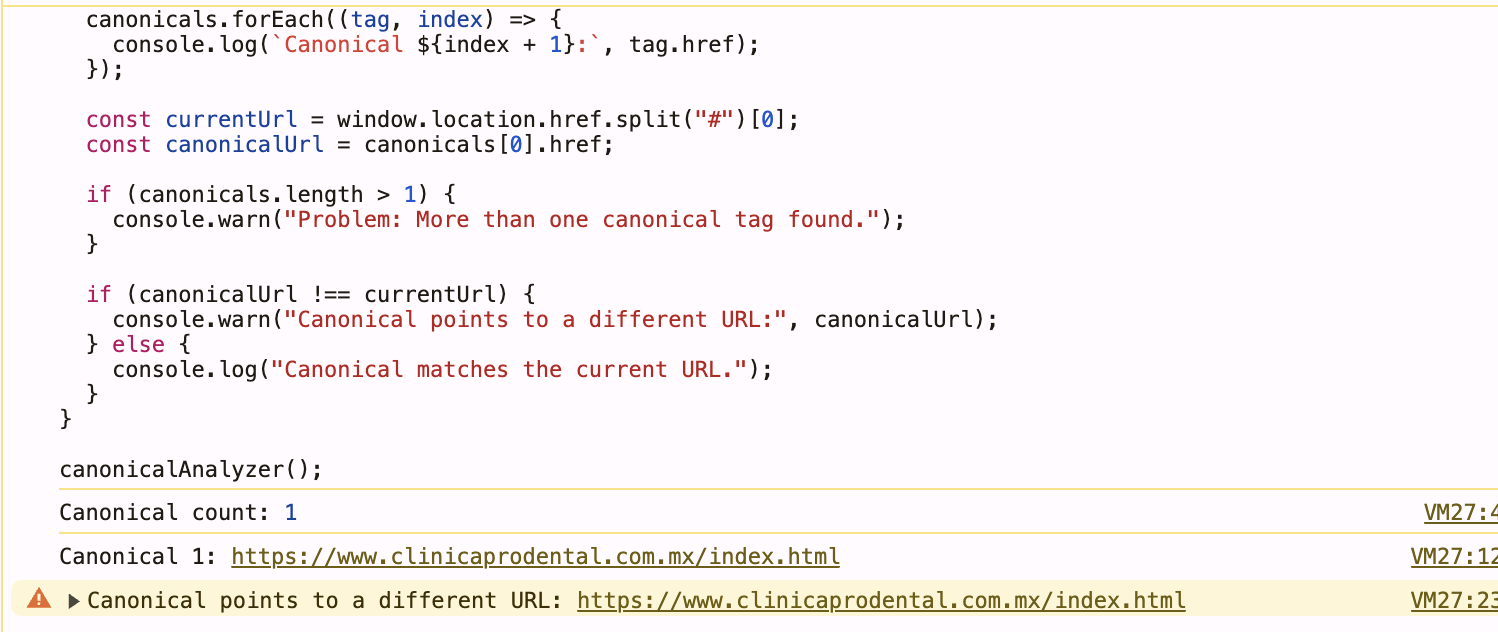
Example result from the browser console
After running the snippet, the browser console shows the number of canonical tags found on the page and prints the canonical URL declared in the HTML. In this example, the page has one canonical tag, but the canonical points to a different URL than the current browser URL.
This does not automatically mean the page is wrong. A different canonical can be intentional when one page is meant to consolidate ranking signals into another preferred page. But it is a signal worth checking carefully, especially when a page is not being indexed, when similar regional pages exist, or when a website has been migrated from one URL structure to another.
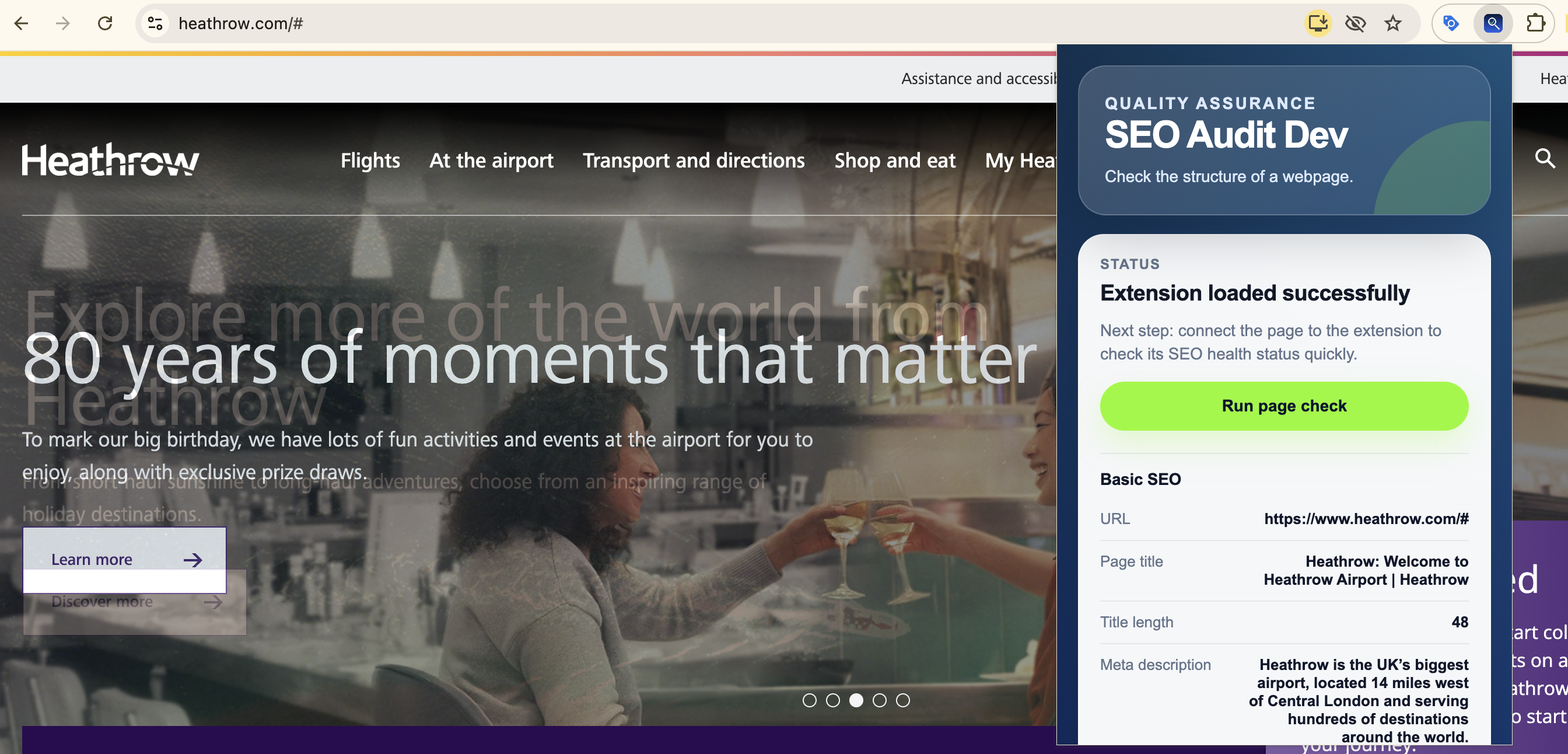
Use my Chrome extension for a faster SEO page check
I also built a Chrome extension called SEO Page Audit. It helps check basic page-level SEO signals directly from the browser, without having to manually inspect the page source every time.
The extension is useful when reviewing landing pages, client websites, content pages, or technical SEO changes after a migration. The goal is to make practical checks faster: page title, meta description, URL structure, canonical signals, and other page-level elements that help you understand whether a page is properly prepared for search engines and AI visibility systems.